SwiftUI concentricCornerRadii in iOS 27 - Complete GeometryReader guide
SwiftUI has steadily made it easier to create interfaces that feel native without requiring developers to manually reproduce the framework’s layout and shape behavior.
With iOS 27, SwiftUI adds two closely related APIs to GeometryProxy:
concentricCornerRadiiconcentricCornerRadii(in:)
These APIs expose the corner radii that SwiftUI calculates for a view based on the rounded corners of its container shape.
That may sound like a small geometry improvement, but it solves a surprisingly common problem: how do you make a custom-drawn view visually align with the rounded corners of the container around it?
Before iOS 27, developers often had to approximate the relationship using hard-coded corner-radius values, nested RoundedRectangles, ContainerRelativeShape, or ConcentricRectangle. Those approaches work well when you are drawing the shape itself, but they are less convenient when you need to obtain the calculated radius and use it somewhere else.
The new APIs expose that calculation directly.
This article explores how they work, how SwiftUI calculates concentric radii, when to use the property versus the method, and how you can use the values with Canvas, Path, animations, and custom SwiftUI components.
What Are Concentric Corners?
Before looking at the APIs, it helps to understand what SwiftUI means by concentric corners.
Consider a large rounded rectangle:
RoundedRectangle(cornerRadius: 48)Now place a smaller rectangle inside it.
Suppose the smaller rectangle sits 12 points away from the top and leading edges of the outer container.
A normal rounded rectangle might use another arbitrary radius:
RoundedRectangle(cornerRadius: 16)That can look acceptable, but its corners aren't necessarily geometrically related to the outer container.
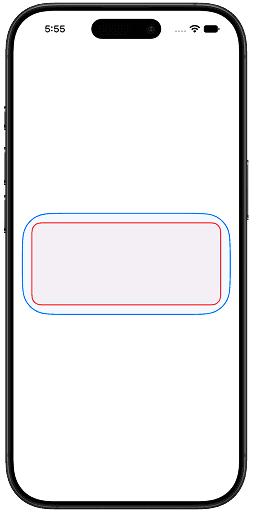
A concentric corner is different.
The smaller rectangle's corner is derived from the corresponding corner of the outer shape. The two corners share the same center point.
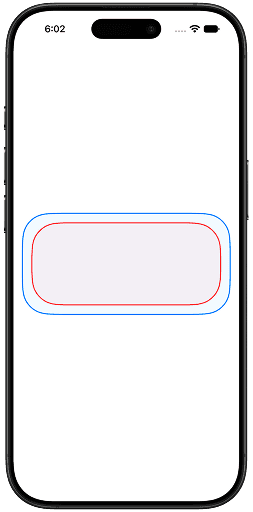
The inner rounded corner follows the geometry of the outer corner instead of simply using an independently selected radius.
This creates the visually consistent nested-corner appearance commonly seen in Apple's system interfaces.
SwiftUI already provides ConcentricRectangle for drawing shapes with this behavior. The important difference with the new GeometryProxy APIs is that they give you the calculated radii without drawing the shape for you.
The Problem Before iOS 27
Imagine that you are creating a card with a rounded container:
RoundedRectangle(cornerRadius: 48)
    .fill(Color.blue.opacity(0.05))
    .stroke(Color.blue, lineWidth: 2)
Inside the card, you want to draw a custom Canvas.
You might want the canvas content to have corners that visually match the surrounding container.
A common approach would be to manually choose a radius:
@State private var lineWidth: CGFloat = 2

Canvas { context, size in
    // Inset by half the line width so the centered stroke isn't clipped by the canvas edges
    let insetRect = CGRect(origin: .zero, size: size)
        .insetBy(dx: lineWidth / 2, dy: lineWidth / 2)

    let path = Path(
            roundedRect: insetRect,
            cornerRadius: 32
        )

    context.fill(path, with: .color(.red.opacity(0.05)))
    context.stroke(path, with: .color(.red), style: StrokeStyle(lineWidth: 2))
}
The problem is that 32 is an approximation.
The outer container might change from:
.cornerRadius(48)to:
.cornerRadius(64)Or the inner view might move.
Or the layout might change size depending on the device.
Your hard-coded 32 no longer represents the correct concentric geometry.
You could build your own geometry calculations, but now you are duplicating behavior that SwiftUI already understands.
iOS 27 gives us a better option.
Meet GeometryProxy.concentricCornerRadii
The first API is an instance property:
var concentricCornerRadii: RectangleCornerRadii? { get }It returns the concentric corner radii for the current GeometryProxy view's bounds relative to its container shape.
A simple example looks like this:
struct ContentView: View {
    @State private var containerCornerRadius: CGFloat = 48
    @State private var lineWidth: CGFloat = 2

    var body: some View {
        ZStack(alignment: .topTrailing) {
            GeometryReader { geometry in
                RoundedRectangle(cornerRadius: containerCornerRadius)
                    .fill(Color.blue.opacity(0.05))
                    .stroke(Color.blue, lineWidth: lineWidth)

                Canvas { context, size in
                    if let radii = geometry.concentricCornerRadii {
                        let insetRect = CGRect(origin: .zero, size: size)
                            .insetBy(dx: lineWidth / 2, dy: lineWidth / 2)

                        let path = Path(
                            roundedRect: insetRect,
                            cornerRadii: radii
                        )

                        let strokeStyle = StrokeStyle(
                            lineWidth: lineWidth,
                        )

                        context.fill(path, with: .color(.red.opacity(0.05)))
                        context.stroke(path, with: .color(.red), style: strokeStyle)
                    }

                }
                .padding()
            }
        }
        .containerShape(
            .rect(cornerRadius: containerCornerRadius)
        )
        .frame(maxWidth: .infinity)
        .frame(height: 180)
        .padding()
    }
}
There are two important pieces here.
First, we give the view a container shape:
.containerShape(.rect(cornerRadius: containerCornerRadius))Then GeometryProxy can resolve the relationship between the current view's bounds and that container shape.
The result is:
geometry.concentricCornerRadiiwhich is a:
RectangleCornerRadii?The optional result is important.
SwiftUI returns nil when it cannot resolve suitable corner information - for example, when there is no applicable container shape or the shape does not provide enough corner information.
Why Does It Return RectangleCornerRadii?
The result isn't a single CGFloat.
That's because each corner can potentially have a different radius.
RectangleCornerRadii represents the radius for each corner:
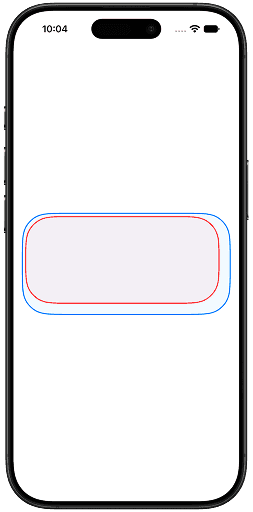
Different corners can have different resolved radii.
This is particularly useful when the geometry of a view isn't symmetrically aligned with its container.
Instead of assuming:
let radius: CGFloat = 24you can work with the actual resolved geometry.
Understanding How SwiftUI Calculates the Radius
The key idea behind the API is straightforward.
For a given corner, SwiftUI considers:
- The container's corner radius.
- The position of the target frame relative to that container corner.
- The maximum radius that the target frame can accommodate.
Conceptually, the calculation is:
inner radius
=
container radius
−
distance from inner corner
  to corresponding container corner
Apple describes concentric corners as sharing the same center point as the container's corners.
For example, suppose the container has a corner radius of:
48 ptand the inner view's corresponding corner is offset by:
12 ptThe resulting concentric radius can be thought of as:
48 − 12 = 36 ptThis is a conceptual model rather than a replacement for SwiftUI's actual geometry resolution, but it provides a useful way to understand what the API is doing.
The important part is that the radius isn't arbitrary.
It comes from the relationship between the view and its container.
The Method: concentricCornerRadii(in:)
The instance method takes a CGRect:
func concentricCornerRadii(in frame: CGRect) -> RectangleCornerRadii?The frame parameter must be expressed in the view's local coordinate space.
This is an important detail.
The method doesn't take an arbitrary global rectangle.
It expects a frame describing the region you want to evaluate relative to the GeometryProxy's local coordinates.
A Basic in: Example
Consider a GeometryReader that contains several custom regions.
We can ask SwiftUI for the concentric radii of a specific rectangle:
GeometryReader { geometry in
    Canvas { context, size in

        let rect = CGRect(
            x: 20,
            y: 20,
            width: 160,
            height: 100
        )

        if let radii = geometry.concentricCornerRadii(
            in: rect
        ) {
            let path = Path(
                roundedRect: rect,
                cornerRadii: radii
            )

            context.fill(
                path,
                with: .color(.blue)
            )
        }
    }
}
.containerShape(.rect(cornerRadius: 48))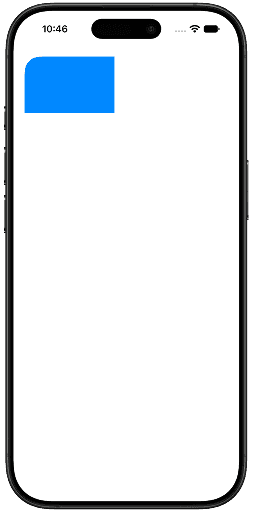
Here, the rectangle is:
CGRect(
    x: 20,
    y: 20,
    width: 160,
    height: 100
)
Instead of asking for the radii of the entire GeometryReader, we're explicitly asking for the radii of that rectangle.
This gives us a way to calculate concentric geometry for subregions.
Why the in: Parameter Is Useful
Consider a custom dashboard.
You might have one large container:
┌─────────────────────────────────────┐
│                                     │
│   ┌──────────┐      ┌──────────┐    │
│   │          │      │          │    │
│   │ Card 1   │      │ Card 2   │    │
│   │          │      │          │    │
│   └──────────┘      └──────────┘    │
│                                     │
└─────────────────────────────────────┘
Each card occupies a different frame.
You could calculate both frames and ask:
geometry.concentricCornerRadii(in: cardFrame)That means a single GeometryReader can become the source of geometry information for multiple custom drawing regions.
This is one of the most interesting differences between the property and the method.
Property
geometry.concentricCornerRadiiWorks with the GeometryProxy's current bounds.
Method
geometry.concentricCornerRadii(in: frame)Works with a specific rectangle.
concentricCornerRadii vs. concentricCornerRadii(in:)
The two APIs solve related problems.
The property:
geometry.concentricCornerRadiianswers:
"What are the concentric corner radii for this GeometryProxy's current bounds?"
The method:
geometry.concentricCornerRadii(in: frame)answers:
"What would the concentric corner radii be for this particular frame?"
That difference becomes important when you are drawing multiple regions inside one GeometryReader.
When Should You Use the Property?
Use:
geometry.concentricCornerRadiiwhen the geometry you care about is the current GeometryReader region.
It is ideal for:
- custom canvas backgrounds
- custom shapes
- masks
- custom borders
- view-sized decorative elements
- custom drawing that occupies the GeometryProxy's bounds
A typical pattern is:
GeometryReader { geometry in
    if let radii = geometry.concentricCornerRadii {
        // Draw using current bounds
    }
}
When Should You Use the Method?
Use:
geometry.concentricCornerRadii(in: frame)when you need the radius for a specific rectangle within the GeometryProxy's coordinate space.
It is better suited for:
- multiple cards
- custom layouts
- individual subregions
- independently positioned drawing areas
- canvas elements
- custom geometry systems
The method gives you more control because the target frame is explicitly supplied.
What Happens When a Corner Is Too Far Away?
Not every corner is guaranteed to receive a large radius.
Apple describes three useful behaviors:
- Corners aligned with the container's corners receive concentric radii.
- Corners farther away from the corresponding container corners can resolve to zero.
- The radius is clamped to the maximum radius supported by the view's bounds.
This matters when a view is positioned somewhere near the middle of a container.
For example:
Outer container

┌──────────────────────────────┐
│                              │
│         ┌──────────┐         │
│         │          │         │
│         │   View   │         │
│         │          │         │
│         └──────────┘         │
│                              │
└──────────────────────────────┘
The inner view is not necessarily aligned with the outer container's corners.
As a result, some of its corners may resolve to:
0rather than receiving a large rounded corner.
This is intentional.
The purpose of the API is not to make every nested rectangle rounded.
It is to preserve the geometric relationship where a concentric relationship exists.
Handling nil Correctly
Because both APIs return an optional:
RectangleCornerRadii?your code should always handle the unresolved case.
A clean pattern is:
guard let radii = geometry.concentricCornerRadii else {
    return
}
Or:
if let radii = geometry.concentricCornerRadii {
    // Use radii
}
You should not assume that a radius always exists.
For example:
GeometryReader { geometry in
    if let radii = geometry.concentricCornerRadii {
        CustomShape(radii: radii)
    } else {
        FallbackShape()
    }
}
This is particularly important when building reusable components that might be used in different containers.
Apple's documentation explicitly states that the APIs can return nil when there is no container shape or when the shape doesn't provide sufficient corner information.
The Role of containerShape
The APIs depend on a container shape.
A simple example is:
.containerShape(
    .rect(cornerRadius: 48)
)
This gives SwiftUI the shape from which it can resolve the concentric geometry.
Without the appropriate container information, this:
geometry.concentricCornerRadiimay return:
nilThe container shape is therefore not just visual decoration.
It becomes part of the geometric relationship used by SwiftUI.
This is also closely related to ConcentricRectangle, which uses container shapes to determine concentric corner geometry.
ConcentricRectangle vs. concentricCornerRadii
SwiftUI already has:
ConcentricRectangleSo why do we need these new APIs?
Because the two approaches solve different problems.
ConcentricRectangle
Use it when you want SwiftUI to draw the concentric shape.
For example:
ConcentricRectangle()
    .fill(.blue)
It is a shape.
concentricCornerRadii
Use the GeometryProxy APIs when you want SwiftUI to give you the calculated radii.
For example:
if let radii = geometry.concentricCornerRadii {
    // Custom drawing
}
Apple explicitly distinguishes the two approaches: ConcentricRectangle calculates and draws the shape, while these GeometryProxy APIs expose the calculated radii for other uses.
A useful rule is:
Need to draw a concentric rectangle? Use
ConcentricRectangle. Need the calculated radii for your own rendering or behavior? UseGeometryProxy.concentricCornerRadii.
Using the Radii in an Animation
Another interesting possibility is using the resolved values as part of a custom animation.
Suppose you have a custom-drawn panel whose size changes during an animation.
Instead of storing a fixed radius:
@State private var radius: CGFloat = 24you can derive the radius from the container relationship.
Conceptually:
GeometryReader { geometry in
    Canvas { context, size in
        guard let radii = geometry.concentricCornerRadii else {
            return
        }

        let rect = CGRect(
            origin: .zero,
            size: size
        )

        let path = Path(
            roundedRect: rect,
            cornerRadii: radii
        )

        context.fill(
            path,
            with: .color(.blue)
        )
    }
}
.containerShape(.rect(cornerRadius: 48))
.animation(.smooth, value: someState)
The geometry automatically follows the changing layout.
That is a major advantage over hard-coded values.
When the position or size changes, the relationship between the view and its container can change as well.
Common Mistake
Treating It Like a Corner Radius Property
One easy mistake is to assume:
geometry.concentricCornerRadiiis equivalent to:
CGFloatIt isn't.
The result is:
RectangleCornerRadii?because the corners may have different values.
So code like this isn't appropriate:
let radius = geometry.concentricCornerRadiiwhen you intend to pass it to an API expecting a single CGFloat.
Instead, use the entire RectangleCornerRadii value with APIs that understand individual corner radii, such as:
Path(
    roundedRect: rect,
    cornerRadii: radii
)
This is one of the reasons the new API is useful for custom drawing.
Forgetting the Container Shape
Another common issue is using:
geometry.concentricCornerRadiiwithout establishing an appropriate container shape.
For example:
GeometryReader { geometry in
    Canvas { context, size in
        print(geometry.concentricCornerRadii)
    }
}
You may receive:
nilInstead, give SwiftUI the shape relationship:
GeometryReader { geometry in
    Canvas { context, size in
        if let radii = geometry.concentricCornerRadii {
            // Use radii
        }
    }
}
.containerShape(.rect(cornerRadius: 48))
The documentation makes it clear that the resolved value depends on having a suitable container shape.
Using the Wrong Coordinate Space
For:
geometry.concentricCornerRadii(in: frame)the frame is expected in the GeometryProxy's local coordinate space.
That means this:
let frame = CGRect(
    x: 20,
    y: 20,
    width: 100,
    height: 100
)

geometry.concentricCornerRadii(in: frame)
is meaningful when those coordinates describe the target rectangle in that local space.
Be careful when obtaining frames from other coordinate spaces using APIs such as:
frame(in:)SwiftUI's geometry APIs operate around explicit coordinate spaces, so mixing global, local, and named-coordinate-space frames without conversion can produce unexpected geometry.
Why This API Is More Than a Convenience
At first glance, concentricCornerRadii may look like a small convenience API.
But the underlying design is more important.
SwiftUI is exposing part of its shape-resolution system to developers.
Instead of saying:
"Here is how to draw a concentric rectangle."
it effectively lets you say:
"Here is the geometry SwiftUI resolved for this relationship. Now you decide what to do with it."
That separation is valuable.
Your application might want to use the geometry to:
- draw something in
Canvas - generate a custom
Path - animate a custom shape
- create a border
- calculate a mask
- synchronize multiple custom-drawn regions
- build reusable design-system components
The API gives you the geometry while leaving the rendering strategy to you.
A Useful Mental Model
You can think about the APIs like this:
            Container Shape
                   │
                   ▼
        ┌─────────────────────┐
        │ SwiftUI resolves    │
        │ concentric geometry │
        └─────────────────────┘
                   │
                   ▼
       RectangleCornerRadii?
                   │
          ┌────────┼────────┐
          ▼        ▼        ▼
       Canvas    Path    Animation
ConcentricRectangle consumes the geometry internally and draws the shape.
GeometryProxy.concentricCornerRadii exposes the geometry so you can decide what happens next.
That is the key distinction.
Property vs. Method at a Glance
| API | Input | Best for |
|---|---|---|
concentricCornerRadii |
Current GeometryProxy bounds | Drawing the current view's region |
concentricCornerRadii(in:) |
A specific CGRect |
Drawing a particular subregion |
ConcentricRectangle |
Shape configuration | Directly rendering a concentric rectangle |
The property is simpler.
The method is more flexible.
And ConcentricRectangle remains the better choice when you simply need a concentric rounded shape rather than the underlying radius values.
When This API Makes the Most Sense
The new APIs are most useful when your UI has a relationship between layout and custom drawing.
For a basic card, this is probably unnecessary:
RoundedRectangle(cornerRadius: 20)
    .fill(.blue)
SwiftUI already handles that perfectly.
But when you need something like:
Container
 ├── Custom Canvas
 ├── Custom border
 ├── Chart
 ├── Decorative shape
 └── Animated mask
and all of those elements should respond to the container's corners, the GeometryProxy APIs become much more valuable.
They allow the geometry to remain dynamic instead of being duplicated throughout the codebase.
Design-System Implications
This can also be useful for SwiftUI design systems.
Suppose your application defines a reusable container:
.containerShape(
    .rect(cornerRadius: 32)
)
Your individual components don't necessarily need to know that the container uses 32.
Instead, custom components can query the resolved geometry.
That means your design system could potentially change the container shape while allowing dependent components to adapt automatically.
For example:
Design System
      │
      ▼
Container Shape
      │
      ▼
Concentric Geometry
      │
 ┌────┼────┐
 ▼    ▼    ▼
Card  Chart  Border
This makes the relationship between components more declarative.
Performance Considerations
These APIs themselves don't mean that every view should be wrapped in a GeometryReader.
GeometryReader is useful when you actually need geometry.
For simple rounded rectangles, prefer normal SwiftUI shapes:
RoundedRectangle(cornerRadius: 24)or, when appropriate:
ConcentricRectangle()The new APIs become useful when custom rendering or geometry-dependent behavior justifies access to the GeometryProxy.
The general rule remains:
Ask SwiftUI for geometry when your UI behavior depends on geometry; don't introduce geometry readers merely to replace straightforward shape modifiers.
Final Thoughts
concentricCornerRadii and concentricCornerRadii(in:) are small additions to SwiftUI, but they solve a very specific and practical problem.
They give developers access to the corner geometry SwiftUI already understands.
The property:
geometry.concentricCornerRadiiis useful when you want the radii for the current GeometryProxy bounds.
The method:
geometry.concentricCornerRadii(in: frame)is useful when you want to resolve the radii for a particular rectangle in the GeometryProxy's local coordinate space.
Both return:
RectangleCornerRadii?which means your code should be prepared for cases where SwiftUI cannot resolve a concentric relationship.
The biggest benefit is that you no longer need to guess or duplicate the relationship between nested rounded corners.
Instead, SwiftUI can provide the resolved geometry, and your code can use it however it needs to.
That makes these APIs especially interesting for Canvas, custom Path drawing, animated shapes, custom borders, masks, and reusable design-system components.
In other words, ConcentricRectangle is useful when you want SwiftUI to draw the concentric shape.
GeometryProxy.concentricCornerRadii is useful when you want SwiftUI to tell you what that concentric geometry is.
And concentricCornerRadii(in:) takes the idea one step further by letting you ask about a specific region inside the container.
That small distinction opens up a lot of possibilities for custom SwiftUI rendering.
Thank you for reading. If you have any questions feel free to follow me on X and send me a DM. If this article helped you, Buy me a coffee.